↓ Skip to main content
  1. Blog/

HowTo: Changing the available display formats for Evernote's "Insert Date" command

·172 words·1 min·
Diego Zamboni
Author
Diego Zamboni
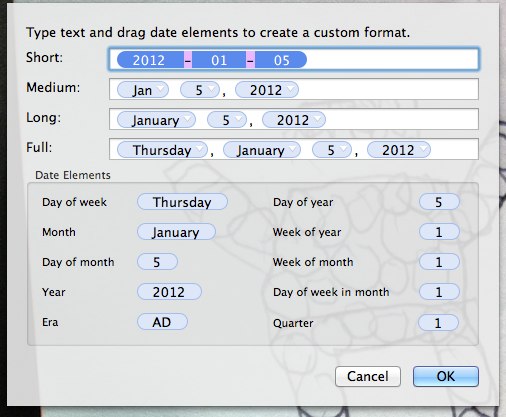
Evernote introduced some time ago an "Insert Date" keyboard shortcut, which is very handy. However, the options for the format of the inserted date seemed limited (only four options). I finally learned how this works, and how to change it on the Mac. The formats offered are those that are configured in the "Languages & Text" preferences panel. If you go to "Region" and then click the "Customize button" in the Dates part of the panel, you will see and be able to customize the formats for short, medium, long and full date representations. Those are the options that are offered to you by Evernote. Just change them to whatever you want, and they will be available for selection. What I specifically wanted to do was to use the YYYY-MM-DD format, so I changed it to the following:

System_preferences

I had to restart Evernote for it to recognize the change, but afterward the new formats were available.


Tip of the hat to Martin Maiers in the Evernote forums, who explained this technique: http://discussion.evernote.com/topic/29812-insert-date-formats-please-add-iso-8601/#entry160872

Find all single-note tags in Evernote

·109 words·1 min
I’ve been working on cleaning up my Evernote, and noticed that I have a lot of tags assigned to a single note. I had successfully used Veritrope’s excellent Evernote empty tag remover applescript, so I made some small changes to write the attached script, which will find all single-note tags in your Evernote and list them in a new note, including links to each note. This makes it much easier to go through them and see which of those tags could be removed. Just download the script, open it in Script Editor and run it. Tip of the hat to Justin for his excellent collection of scripts at Veritrope!

Fast translation with Google Translator

·56 words·1 min
via https://medium.com/@mrdoro/fast-translation-with-google-translator-and-mac-osx-817e32233b7a https://medium.com/@mrdoro/fast-translation-with-google-translator-and-mac-osx-817e32233b7a Nice article about how to create a service to automatically translate selected text from any application. I use this all the time, I have a “German-to-English” service bound to Command-Alt-Ctrl-Shift-E, so I can just select text off the screen, press the shortcut, and a window with the translation will pop up. Very handy.